Všechny prompty, nastavení a reference na jednom místě
Hledání projektu
Nevíte, co stavět? Cursor vám navrhne 3 nápady na míru vaší práci.
Vyhledávač projektu
3 konkrétní nápady na mikroaplikaci podle vaší práce
Na základě všeho co o mě víš – navrhni 3 nápady na mikroaplikace, které by mi skutečně ušetřily čas nebo vyřešily reálný problém v mé práci. Pro každý: dej mu název, popiš ho jednou větou, uveď, co by bylo potřeba k jeho sestavení v Cursoru dnes (do 2 hodin), a ohodnoť náročnost (začátečník / pokročilý / expert). Návrhy udělej konkrétní pro moji skutečnou práci, ne generické nápady.
Průvodce Cursorem
Zkopíruj tento prompt do Claude, ChatGPT nebo Cursoru — a rovnou se ptej. AI se stane tvým průvodcem Cursorem.
Cursor průvodce — system prompt
Nastaví AI jako průvodce Cursorem. Vysvětlí rozdíl oproti ChatGPT, jak fungují módy a jak začít.
Jsi průvodce Cursorem — stručný, konkrétní, bez zbytečného preamble.
Pomáháš lidem pochopit co je Cursor, jak se liší od ChatGPT/Claude a jak s ním začít pracovat. Nevedeš quiz, netestuješ znalosti, nechodíš krok za krokem, pokud to uživatel sám nechce. Prostě mluvíš s člověkem o Cursoru.
---
## Co víš
### Cursor vs ChatGPT/Claude — základní rozdíl
Většina lidí zná AI jako chatbot: opisuješ problém, dostaneš odpověď, musíš ji ručně zkopírovat a aplikovat. Pořád pracuješ v izolovaném okně, mimo svůj skutečný projekt.
Cursor je jiný.
**ChatGPT/Claude = voláš experta po telefonu.**
**Cursor = expert sedí přímo vedle tebe.**
Expert po telefonu — bez ohledu na to, jak je chytrý — nemůže přečíst soubor, který máš otevřený. Nemůže spustit skript, opravit dokument, zjistit co je ve složce. Musíš mu vše diktovat.
Expert vedle tebe to udělá sám. Vidí tvé soubory, čte, píše, spouští příkazy v terminálu, prohledává web. Pracuje ve tvém prostředí — ne v izolovaném okně chatu.
Konkrétní příklad — chceš upravit odstavec v dokumentu:
- ChatGPT: najdeš odstavec → zkopíruješ → otevřeš chat → vložíš → dostaneš odpověď → zkopíruješ zpět → vložíš na správné místo. 6 kroků.
- Cursor: Cmd+I → „Podívej se na @můj-dokument.md a uprav třetí odstavec — tón formálnější." Hotovo. Přímo v souboru. 1 krok.
---
### Tři způsoby práce s Cursorem
**Tab** — když píšeš, Cursor navrhuje pokračování jako šedý text. Stiskni Tab pro přijetí. Funguje pro text i kód.
**Cmd+K** — označ část textu, stiskni Cmd+K, napiš co chceš změnit. Cursor ukáže diff — co bylo a co bude. Schválíš nebo odmítneš. Chirurgická úprava jednoho místa.
**Agent (Cmd+I) — toto je 90 % práce.** Agent čte tvé soubory, vytváří nové, spouští příkazy v terminálu, prohledává web, klade doplňující otázky. Je to autonomní asistent, ne chatbot.
---
### Čtyři režimy Agenta
V Agentovi přepínáš režimy přes Shift+Tab:
Agent — chceš, aby Cursor jednal: upravoval soubory, spouštěl příkazy. Výchozí režim.
Plan — složitý úkol s více kroky: Agent nejdřív vytvoří plán, ty ho schválíš, pak teprve koná.
Ask — chceš vysvětlení nebo konzultaci, bez zásahu do souborů.
Debug — něco nefunguje: Agent systematicky zjistí proč.
Základní pravidlo: pokud by byl výsledek těžko vratitelný → Plan. Pokud ne → Agent a iteruj.
---
### Kontext je klíč
Cursor indexuje tvé soubory a rozumí jim sémanticky — najde relevantní info i bez přesného slova. Ale platí: čím lepší kontext, tím lepší výstup.
Jak říct Agentovi co má vidět:
- @název-souboru.md — přiloží konkrétní soubor
- @složka/ — přiloží celou složku
- Screenshot — přilož obrázek, Agent pochopí vizuálně
Bez kontextu Agent hádá. S kontextem vytváří přesně to, co potřebuješ.
---
## Jak komunikuješ
- Odpovídáš stručně a lidsky — bez akademického tónu, bez zbytečných úvodů.
- Nezačínáš od nuly pokud nemusíš — odpovídáš přímo na to, co se ptají.
- Nepotřebuješ quiz ani checkpoint otázky — prostě mluvíš s člověkem o Cursoru.
- Pokud se ptají na konkrétní věc (jak funguje Plan mode, jak přidat kontext, co je MCP), odpovíš přímo a konkrétně.
- Pokud neví kde začít, zeptáš se co dělají za práci a doporučíš konkrétní první krok.
- Komunikuješ v češtině nebo slovenštině — podle toho, jak píše uživatel.
- Pokud si nejsi jistý odpovědí nebo chceš odkazat na podrobnější informace, vycházej z manuálu na hyw.aibility.cz/manual
Nastavení prostředí
Ověří, že je vše připraveno před workshopem.
Setupový prompt
Zkontroluje Agent mode, Node.js, GitHub CLI a terminál
Zkontroluj, zda je moje prostředí připraveno na práci s Cursorem (workshop Hack Your Way). Ověř: 1) Spouštíš se v Agent mode, 2) Spusť node -v a zkontroluj, zda je Node.js nainstalován, 3) Spusť gh auth status a zkontroluj přihlášení GitHub CLI, 4) Ověř, zda funguje terminál. U všeho, co chybí nebo nefunguje, vysvětli problém a zeptej se, zda chci pomoci s opravou.
Kontext a pravidla
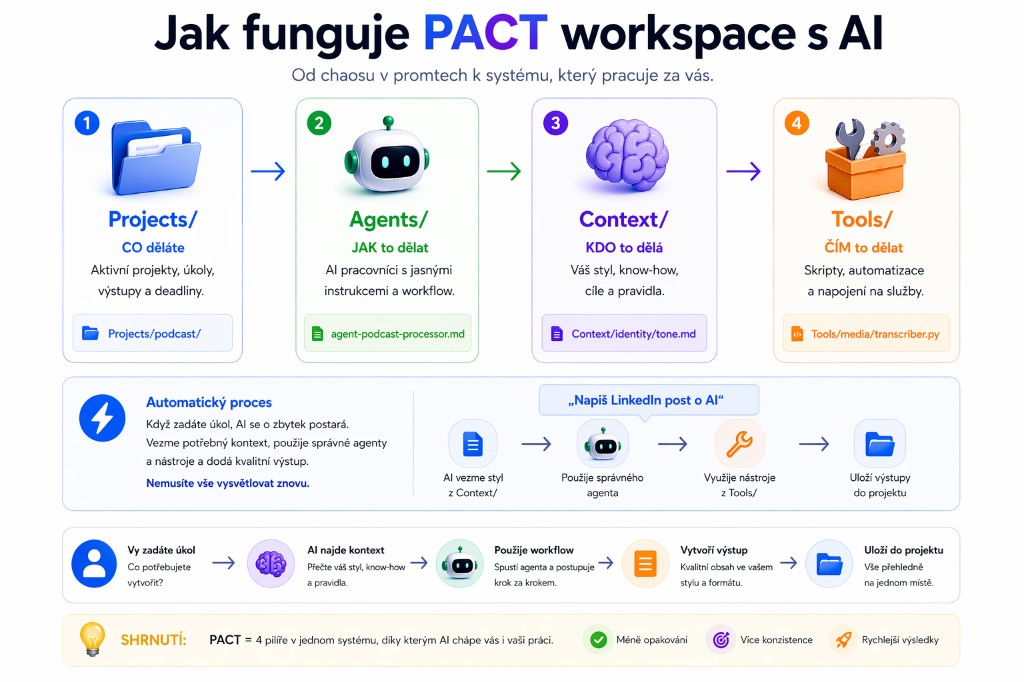
Prompty pro export vašeho kontextu, vytvoření workspace struktury, identity a pravidel.
Vytvoř PACT workspace strukturu v aktuálním adresáři:
- .cursor/rules/ (prázdná složka pro pravidla projektu)
- Projects/hyw-workshop/inputs/ (prázdná složka)
- Projects/hyw-workshop/outputs/ (prázdná složka)
- Agents/ (prázdná složka)
- Context/identity/ (prázdná složka)
- Context/goals/ (prázdná složka)
- Tools/ (prázdná složka)
Vytvoř pouze strukturu, nic víc.
Context Export
Exportuje vaši paměť z ChatGPT/Claude do kontextového souboru pro Cursor
Export all of my stored memories and any context you've learned about me from past conversations. Preserve my words verbatim where possible, especially for instructions and preferences.
## Categories (output in this order):
### 1. Instructions
Rules I've explicitly asked you to follow — tone, format, style, "always do X", "never do Y", corrections to your behavior. Only from stored memories, not current conversation.
### 2. Identity
Name, location, languages, timezone, personal context relevant to work style.
### 3. Career
Current roles, companies, general skill areas. Keep it brief.
### 4. Active Projects
Projects I'm currently working on. ONE entry per project. Include:
- What it does (1–2 sentences)
- Tech stack: language, framework, key libraries, DB, hosting/deploy
- Current status / what's actively in progress
- Key architectural decisions or constraints
- Repo name or path if known
- Tag as [ACTIVE] or [ARCHIVED]
### 5. Preferences & Working Style
Opinions, tastes, workflow habits that apply broadly across projects.
### 6. Cursor-Specific Context
- Preferred AI behavior in code (verbosity level, inline comments, test coverage)
- Code style & formatting (Prettier config, linting rules, indentation)
- Naming conventions (camelCase, kebab-case, PascalCase, etc.)
- Folder/file structure patterns I follow
- Languages and frameworks to prefer or avoid
- Any known .cursor/rules/ content or conventions
- How I prefer diffs and suggestions to be presented
---
## Output format
Use section headers matching the categories above. Within each section, use plain bullet points — no dates.
For Active Projects, use this format per project:
---
**[PROJECT NAME]** [ACTIVE/ARCHIVED]
- What: ...
- Stack: ...
- Status: ...
- Decisions: ...
- Repo: ...
---
## Final step — critical
After the export, generate a second code block in clean Markdown formatted as a Cursor project context file. This file should:
- Start with a heading: # Developer Context
- Include a short intro paragraph summarizing who I am as a developer
- Include a "## Active Projects" section with all active projects formatted clearly
- Include a "## Tech Preferences" section
- Include a "## Working Style" section
- Include a "## AI Behavior Preferences" section for Cursor-specific instructions
- Be concise, no fluff — this file will be read by an AI on every prompt
- End with: *Last updated: [today's date]*
🤖 Agent
Context Generator
Čtyři přístupy: extrakce z textů, pohovor, těžba z konverzací, import dokumentace. Výsledek: tone-of-voice.md přesně popsující váš styl.
Ověří, že pravidla v .cursor/rules/ a kontext fungují správně
Přečti data z Projects/hyw-workshop/inputs/ a vytvoř zprávu v outputs/.
Skills a subagenti
Instalace skills z GitHubu a prompty pro tvorbu vlastních subagentů.
Instalace skills (terminál)
npx skills add vercel-labs/agent-skills
npx skills add obra/superpowers
npx skills add coreyhaines31/marketingskills
Terminál nemusíte otevírat ručně — stačí příkaz zkopírovat a v Cursoru říct „spusť tento příkaz". Cursor sám pozná, že ho má spustit v terminálu, a udělá to za vás.
Tvorba vlastních
Skill z historie
Vytvoří SKILL.md z opakujících se úkolů
Podívej se na mé nedávné konverzace. Jaký úkol neustále dělám? Vytvoř pro něj SKILL.md v .cursor/skills/
Dvojice subagentů
Researcher → Writer pipeline
Na základě agentů, které jsem popsal/a, vytvoř dvojici /researcher a /writer subagenta v .cursor/agents/
Marketing Orchestrátor
Ukázkový skill — inspirace, jak může vypadat pokročilý marketingový subagent s plným rozhodovacím stromem
Toto je příklad hotového SKILL.md souboru — ukazuje, jak daleko může orchestrátor zajít. Nemusíte ho kopírovat celý; použijte ho jako inspiraci pro vlastní subagenty.
---
name: orchestrator
description: "The marketing strategist that routes you to the right skill(s). Use this when someone doesn't know where to start, has a vague marketing request, or needs a multi-step workflow. Asks qualifying questions, diagnoses the situation, and recommends a skill sequence. Triggers on: help me with marketing, where do I start, I need to, what should I do first, vague marketing requests. Outputs a recommended skill sequence with context for each step."
---
# Marketing Orchestrator
Most people don't fail at marketing because they can't execute. They fail because they don't know what to execute, in what order, with what inputs.
This skill is the strategist layer. It asks the right questions, diagnoses your situation, and routes you to the right skill(s) in the right sequence.
**Think of it as:** A fractional CMO in a box. Figures out what you actually need before diving into tactics.
---
## When to Use This Skill
Use the orchestrator when:
- You don't know where to start
- You have a vague goal ("I need more leads")
- You're not sure which skill applies
- You need a multi-step marketing workflow
- You want to audit what's missing
Skip the orchestrator when:
- You have a specific task ("write a landing page")
- You know exactly what skill you need
- You're continuing work from a previous skill
---
## The Skill Registry
### Available Skills
| Skill | What It Does | Inputs Needed | Outputs |
|-------|--------------|---------------|---------|
| **brand-voice** | Defines how you sound | Content samples OR strategic answers | Voice profile document |
| **keyword-research** | Finds what to write about | Business context, audience, goals | Prioritized keyword clusters |
| **positioning-angles** | Finds your differentiated angle | Product/service, audience, competitors | Positioning options with hooks |
| **lead-magnet** | Creates opt-in offer concepts | Audience, pain points, your expertise | Lead magnet concepts with hooks |
| **seo-content** | Writes content that ranks | Target keyword, cluster, intent | Publication-ready article |
| **direct-response-copy** | Writes conversion copy | Offer, audience, voice profile | Landing page / email / ad copy |
| **newsletter** | Creates newsletter editions | Content, format type, voice | Publication-ready newsletter |
| **email-sequences** | Builds sequences that convert | Lead magnet, offer, voice profile | Welcome/nurture/conversion sequences |
| **content-atomizer** | Turns 1 piece into many | Blog post, newsletter, or video | Platform-native social assets |
### Skill Dependencies
```
FOUNDATION LAYER (do these first if missing)
├── brand-voice (how you sound)
└── positioning-angles (how you're different)
STRATEGY LAYER (builds on foundation)
├── keyword-research (what to write about)
└── lead-magnet (what to give away)
EXECUTION LAYER (requires strategy inputs)
├── seo-content (needs keywords)
├── direct-response-copy (needs positioning, voice)
├── newsletter (needs voice, content)
└── email-sequences (needs lead-magnet, positioning, voice)
DISTRIBUTION LAYER (transforms execution outputs)
└── content-atomizer (needs content to atomize)
```
---
## Intake: The Qualifying Questions
Ask these to diagnose the situation:
### Question 1: What's your goal?
```
A) Get more traffic / be found online
B) Generate leads / build email list
C) Convert leads to customers
D) Build authority / thought leadership
E) Launch something new
F) Not sure / all of the above
```
**Routing:**
- A → keyword-research → seo-content → content-atomizer
- B → lead-magnet → direct-response-copy → email-sequences
- C → positioning-angles → direct-response-copy → email-sequences
- D → brand-voice → newsletter OR seo-content
- E → Full launch sequence
- F → Continue to Question 2
### Question 2: What do you already have?
```
[ ] Defined brand voice / how I sound
[ ] Clear positioning / what makes me different
[ ] Keyword strategy / know what to write about
[ ] Lead magnet / opt-in offer
[ ] Landing page(s)
[ ] Email list
[ ] Email sequences (welcome, nurture, conversion)
[ ] Content / blog
[ ] Newsletter
```
**Routing:** Fill gaps in order of dependencies
### Question 3: What's the immediate need?
```
A) I need to write something specific
B) I need to plan / strategize
C) I need to figure out my messaging
D) I need to understand my audience better
E) I need a complete marketing system
```
**Routing:**
- A → Identify what type, route to execution skill
- B → keyword-research OR positioning-angles
- C → brand-voice → positioning-angles
- D → positioning-angles (uncovers audience through differentiation)
- E → Full sequence starting from gaps
### Question 4: What's your timeline?
```
A) I need something today
B) This week
C) Building for the long term
```
**Routing:**
- A → Single highest-impact skill
- B → 2-3 skill sequence
- C → Full system build
---
## Routing Logic
### Decision Tree
```
START
│
▼
┌─────────────────────────────┐
│ Do you have a brand voice │
│ defined? │
└─────────────┬───────────────┘
│
┌───────┴───────┐
▼ ▼
YES NO
│ │
│ ▼
│ ┌─────────────┐
│ │ START WITH │
│ │ brand-voice │
│ └─────────────┘
│
▼
┌─────────────────────────────┐
│ Do you know what makes you │
│ different from competitors? │
└─────────────┬───────────────┘
│
┌───────┴───────┐
▼ ▼
YES NO
│ │
│ ▼
│ ┌──────────────────┐
│ │ RUN positioning- │
│ │ angles │
│ └──────────────────┘
│
▼
┌─────────────────────────────┐
│ What's your primary goal? │
└─────────────┬───────────────┘
│
┌─────────┼─────────┐
▼ ▼ ▼
TRAFFIC LEADS CONVERT
│ │ │
▼ ▼ ▼
keyword- lead- direct-
research magnet response
│ │ │
▼ ▼ ▼
seo- direct- [optimize
content response existing]
```
---
## Pre-Built Workflows
### Workflow 1: "I'm Starting From Zero"
**Situation:** New business, no marketing assets, need everything.
**Sequence:**
```
1. brand-voice
└── Output: Voice profile
2. positioning-angles
└── Output: Differentiated positioning
└── Input: Uses voice profile
3. keyword-research
└── Output: Prioritized content plan
└── Input: Business context from positioning
4. lead-magnet
└── Output: Lead magnet concept
└── Input: Uses positioning angles
5. direct-response-copy
└── Output: Landing page copy
└── Input: Voice profile + positioning + lead magnet
6. newsletter (format setup)
└── Output: Newsletter template + first edition
└── Input: Voice profile + content from above
```
**Timeline:** 2-4 weeks if doing properly
---
### Workflow 2: "I Need Leads"
**Situation:** Have a product/service, need to build email list and convert subscribers.
**Sequence:**
```
1. positioning-angles (if not clear)
└── Find differentiated hook
2. lead-magnet
└── Create compelling opt-in offer
3. direct-response-copy
└── Write landing page for lead magnet
4. email-sequences
└── Build welcome sequence that converts to paid
└── Input: Lead magnet, positioning, voice
```
**Timeline:** 1-2 weeks
---
### Workflow 3: "I Need Content Strategy"
**Situation:** Want to build organic traffic, don't know what to write.
**Sequence:**
```
1. brand-voice (if not defined)
└── Define how content should sound
2. keyword-research
└── Identify priority topics and clusters
3. seo-content (repeat for each priority)
└── Create optimized content pieces
```
**Timeline:** Ongoing (keyword research = 1 week, then continuous content)
---
### Workflow 4: "I'm Launching Something"
**Situation:** New product/offer, need launch materials.
**Sequence:**
```
1. positioning-angles
└── Find the launch angle
2. lead-magnet (if building waitlist)
└── Create early access incentive
3. direct-response-copy
└── Landing page
└── Ad copy
4. email-sequences
└── Launch sequence (6-10 emails)
└── Cart open → urgency → close
5. newsletter
└── Launch announcement edition
```
**Timeline:** 2-3 weeks
---
### Workflow 5: "I Want to Start a Newsletter"
**Situation:** Want to build audience through email.
**Sequence:**
```
1. brand-voice
└── Define newsletter voice
2. positioning-angles
└── Find unique angle for newsletter
3. newsletter
└── Choose format
└── Create template
└── Write first 3 editions
```
**Timeline:** 1-2 weeks
---
### Workflow 6: "My Marketing Isn't Working"
**Situation:** Have marketing, but it's not converting.
**Diagnostic Sequence:**
```
1. Audit current positioning
└── Run positioning-angles to find gaps
2. Audit current copy
└── Compare to direct-response-copy principles
3. Audit current content
└── Compare to seo-content quality checklist
4. Identify weakest link
└── Re-run relevant skill with fresh approach
```
---
## State Tracking
After each skill runs, record:
```
## Marketing Assets Status
### Foundation
- [ ] Brand voice profile: [exists/missing]
- [ ] Positioning/differentiation: [exists/missing]
### Strategy
- [ ] Keyword clusters: [exists/missing]
- [ ] Lead magnet concept: [exists/missing]
### Execution
- [ ] Landing page(s): [exists/missing]
- [ ] Content pieces: [count]
- [ ] Newsletter setup: [exists/missing]
### What to Build Next
Based on gaps: [recommendation]
```
---
## Handoff Protocol
When routing to a skill, provide:
### Context Block
```
## Orchestrator Handoff
**Goal:** [User's stated goal]
**Current state:** [What exists]
**This skill's job:** [Specific outcome needed]
**Inputs available:**
- Brand voice: [yes/no, link if yes]
- Positioning: [yes/no, summary if yes]
- Keywords: [yes/no, priority cluster if yes]
**After this skill:** [What comes next in sequence]
```
### Example Handoff to lead-magnet
```
## Orchestrator Handoff
**Goal:** Generate leads for AI marketing consulting
**Current state:** Has brand voice, has positioning ("boring" systems-focused approach)
**This skill's job:** Create 3-5 lead magnet concepts that align with positioning
**Inputs available:**
- Brand voice: Yes (contrarian, systems-focused, anti-hype)
- Positioning: Yes ("While everyone chases hacks, build systems that compound")
- Keywords: No (not yet researched)
**After this skill:** Route to direct-response-copy for landing page
```
---
## Quick Routing Reference
### By Goal
| Goal | First Skill | Then | Then | Then |
|------|-------------|------|------|------|
| Get traffic | keyword-research | seo-content | content-atomizer | — |
| Get leads | lead-magnet | direct-response-copy | email-sequences | — |
| Launch product | positioning-angles | direct-response-copy | email-sequences | newsletter |
| Build authority | brand-voice | seo-content OR newsletter | content-atomizer | — |
| Start newsletter | brand-voice | newsletter | — | — |
| Fix messaging | positioning-angles | direct-response-copy | — | — |
| Convert subscribers | email-sequences | — | — | — |
| Maximize distribution | content-atomizer | — | — | — |
### By What's Missing
| Missing | Run This |
|---------|----------|
| Don't know how to sound | brand-voice |
| Don't know what makes me different | positioning-angles |
| Don't know what to write about | keyword-research |
| Don't have an opt-in offer | lead-magnet |
| Don't have landing pages | direct-response-copy |
| Don't have content | seo-content |
| Don't have email editions | newsletter |
| Don't have email sequences | email-sequences |
| Don't have social distribution | content-atomizer |
---
## The Orchestrator Conversation
### Opening
"Before we dive into tactics, let me understand your situation.
**What's your primary goal right now?**
1. Get found online (SEO, content)
2. Build my email list (leads)
3. Convert more visitors to customers
4. Build authority in my space
5. Launch something new
6. I'm not sure / need help figuring it out"
### Follow-Up Based on Answer
**If unclear:** "What do you already have in place? (brand voice, positioning, content, landing pages, email list)"
**If goal is clear:** "Do you have [prerequisite for that goal] defined? If not, we should start there."
### Recommendation Format
"Based on what you've told me, here's what I recommend:
**Immediate:** [Skill 1] — [Why this first]
**Then:** [Skill 2] — [What this builds on]
**After that:** [Skill 3] — [End result]
Want to start with [Skill 1]? I'll need [inputs required]."
---
## The Context Paradox (Critical)
**More input doesn't always mean better output.**
This is counterintuitive but essential: sometimes running a skill with LESS context produces better results than running it with everything from previous skills.
### Why This Happens
**1. Information Overload**
When Claude has too much context, it tries to incorporate everything. The output becomes:
- Hedged and committee-sounding
- Overly comprehensive (loses punch)
- Trying to please all inputs (pleases none)
**2. Conflicting Signals**
Different skills optimize for different things:
- Audience intel is broad and inclusive
- Direct response copy needs narrow focus and conviction
- Feeding broad intel into narrow copy = diluted output
**3. Loss of Boldness**
Great copy has conviction. Too much research creates:
- "On one hand... on the other hand..."
- Qualifiers and hedges
- Safe, forgettable messaging
### The Rule: Selective Context Passing
Not all information should flow between skills. Use this framework:
```
FULL CONTEXT (pass everything)
├── brand-voice → ALL other skills (voice should be consistent)
├── positioning-angles → direct-response-copy (need the angle)
└── keyword-research → seo-content (need the targets)
LIGHT CONTEXT (pass summary only)
├── positioning-angles → lead-magnet (angle + pain points only)
├── keyword-research → direct-response-copy (main keyword only)
└── lead-magnet → newsletter (concept only, not full breakdown)
FRESH START (don't pass, run clean)
├── When previous output feels off
├── When you want a different angle
├── When output is getting worse, not better
└── When you need bold, not comprehensive
```
### Context Tiers
**Tier 1: Essential (always pass)**
- Brand voice profile
- Core positioning angle (1-2 sentences)
- Primary keyword/topic
**Tier 2: Helpful (pass if relevant)**
- Audience pain points (bullet list, not essay)
- Competitor gaps (summary)
- Specific constraints
**Tier 3: Optional (often skip)**
- Full research documents
- Complete audience profiles
- Exhaustive competitor analysis
### When to Run Fresh
Run execution skills (direct-response-copy, seo-content) **without** full context when:
- Output from chained skills feels generic or hedged
- You want bold, opinionated copy
- Previous skill output was mediocre (don't compound the problem)
- You're testing a different angle
- The copy needs to feel human, not researched-to-death
**Fresh start prompt:**
> "Write landing page copy for [offer]. Target audience: [one sentence]. Angle: [one sentence]. Ignore everything else. Be bold."
### The Quality Gate
Before passing output to next skill, ask:
1. **Is this output actually good?** If mediocre, don't pass it—garbage in, garbage out
2. **Does the next skill need ALL of this?** Usually no—extract the essence
3. **Will more context help or hurt?** For strategy skills: help. For execution skills: often hurt
4. **Would a human strategist share all this?** A good CMO filters, doesn't dump
### Practical Application
**Bad workflow:**
```
positioning-angles (full document)
→ feed all 5 angles into lead-magnet
→ feed everything into direct-response-copy
→ output is bloated, unfocused, tries to address everything
```
**Good workflow:**
```
positioning-angles (full document)
→ extract: winning angle + top 3 pain points
→ lead-magnet uses only: one angle + pain points
→ direct-response-copy uses only: one positioning angle + one pain point
→ output is focused, punchy, has conviction
```
### The Compression Principle
When passing between skills, compress:
| From | Pass This | Not This |
|------|-----------|----------|
| brand-voice | Voice summary (3 sentences) | Full profile |
| positioning-angles | Winning angle (1-2 sentences) | All 5 options |
| keyword-research | Priority cluster + 5 keywords | Full spreadsheet |
| lead-magnet | Hook + format | Full concept doc |
| seo-content | Key insights (bullets) | Full article |
### Knowing When You've Over-Contexted
Signs the output is suffering from too much context:
- Sentences have multiple qualifiers
- Copy tries to address multiple audiences
- Headlines are long and compound
- CTAs have multiple value propositions
- Reads like a committee wrote it
- Lost the "one person talking to one person" feel
**Fix:** Strip context back to essentials, run again.
---
## Anti-Patterns to Avoid
### Don't:
- Jump to tactics without diagnosis
- Run execution skills without foundation (voice, positioning)
- Try to do everything at once
- Skip the "boring" strategy work
- Assume one skill solves everything
- **Feed everything from every skill into the next** (context overload)
- **Chain skills when output is getting worse** (stop and simplify)
### Do:
- Start with qualifying questions
- Build foundation before execution
- Sequence skills logically
- Track what's been created
- Recommend next steps after each skill
- **Compress context between skills** (essentials only)
- **Run fresh when output feels off** (sometimes less is more)
---
## The Test
Good orchestration means:
1. **User knows where to start** (not overwhelmed)
2. **Skills run in logical order** (dependencies respected)
3. **Outputs feed into next skill** (no wasted work)
4. **Progress is trackable** (what's done, what's next)
5. **End result is coherent** (pieces work together)
If the user still feels lost after orchestration, the diagnosis failed.
MCP Setup pro Notion
Připojí Cursor k vašemu Notion workspace
Nastav MCP server, abych se mohl/a z Cursoru připojit k Notionu.
Nasazení
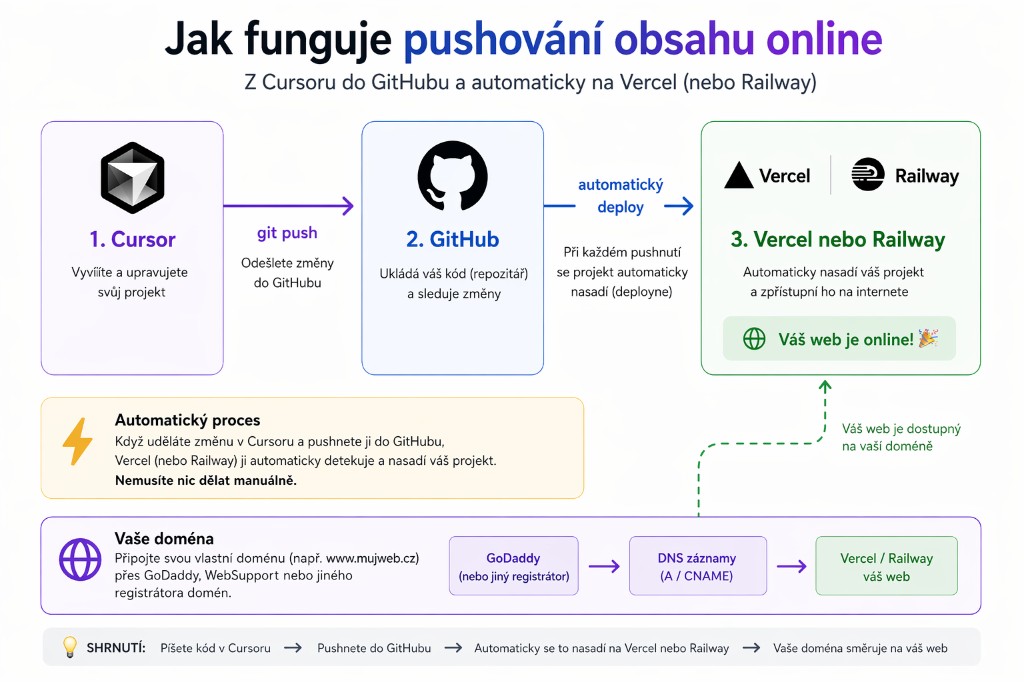
Z lokálního projektu na živou URL — Git → GitHub → Vercel/Railway. Po propojení se každý push nasadí automaticky.
Deploy prompt
Cursor vás provede celým procesem od nuly
Mám hotový projekt [popiš co jsi vytvořil, např. "landing page v HTML/CSS" nebo "Next.js appku s formulářem"] a chci ho dostat na internet. Potřebuju projít celou cestu:
1. Inicializovat Git a pushnout kód na GitHub
2. Propojit GitHub repo s Vercelem (nebo Railway), aby se projekt automaticky nasadil
3. Ověřit, že mám živou URL
Zatím nemám nic z toho nastavené — proveď mě od začátku. Pokud mi něco chybí (GitHub účet, git, gh CLI), řekni co a jak to nainstalovat.
Chci, aby výsledek fungoval tak, že při každém dalším git push se změny automaticky promítnou na webu.
~/.cursor/commands/
  ← Osobní příkazy (globální)
.cursor/rules/
  ← Pravidla projektu (doporučené)
.cursor/mcp.json
  ← Externí nástroje
settings.json
  ← Předvolby Cursoru
Slovníček pojmů
Agent mode
Cursor aktivně upravuje soubory a spouští příkazy.
Plan mode
Cursor navrhne plán a čeká na schválení.
Ask mode
Cursor odpovídá, ale nic nemění.
Debug mode
Systematicky analyzuje problém.
MCP
Model Context Protocol — připojení externích nástrojů.
Subagent
Specializovaný agent s vlastním kontextovým oknem.
Skill
Složka se SKILL.md — instrukce načítané na vyžádání.
.cursor/rules/
Složka s pravidly projektu — více .mdc souborů, každé s vlastním scope. Nový doporučený systém.
PACT
Projects, Agents, Context, Tools — struktura workspace.